Electro Cables
Login

How to Choose the Best Diamond LED Display?

A Diamond Led Display can turn a plain wall into a striking visual feature, but its unusual shape is only one part of the decision. The right model should fit the room, viewing distance, content, and installation plan. A sharp image from two meters away may look different across a large lobby. Measure the space before comparing product photos.

Pixel pitch affects detail and comfortable viewing distance. Brightness matters near windows, while refresh rate can influence how screens appear on camera. Check whether the display is designed for indoor or outdoor use, and ask for documented specifications rather than relying on broad sales claims. Small details count. Cabinet weight, access for maintenance, and the control system can affect installation and ongoing costs. A beautiful screen that is difficult to service is not always the best choice.

Before selecting a supplier, request a layout, a sample viewing, and clear warranty terms. Ask how replacement modules are handled and whether local technicians can support the system. These questions may feel overly cautious, yet they help reveal gaps early. Not every project has a perfect answer. Room lighting, structural limits, and budget can pull the decision in different directions. This guide explains how to compare those trade-offs and choose a Diamond Led Display that suits both the visual goal and the practical demands of the site.
How to Choose the Best Diamond LED Display?

Define Diamond LED Display Geometry, Facet Size, and Module Layout

How to Choose the Best Diamond LED Display?
Define Diamond LED Display Geometry, Facet Size, and Module Layout

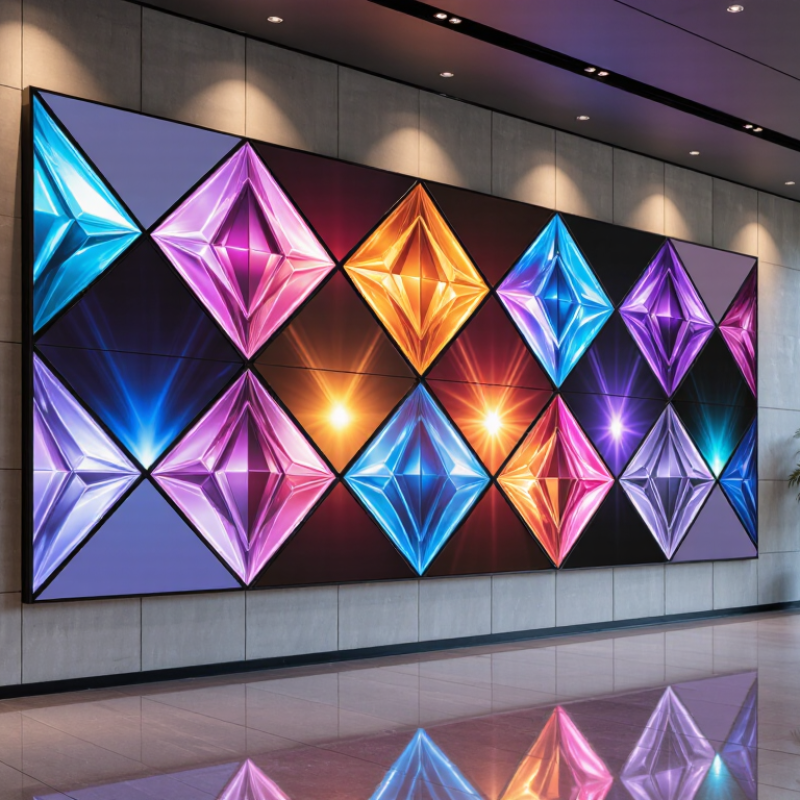
Start with the display’s outline, not its pixel pitch. Sketch the full diamond shape on a wall plan, then note its height, width, corner angles, and viewing distance. A tall, narrow design can feel very different from a broad, low one. Check nearby doors, ceiling lines, and sightlines so the outer corners do not look awkward or get blocked.

Facet size affects how clearly the surface reads as a diamond. Large facets create a bold pattern, while smaller facets add detail but may make module seams more noticeable. Confirm each module’s dimensions and how its edges meet at the center and perimeter. Ask for a scaled layout or a small physical mock-up. Measurements can look neat on paper and still feel off in the room; that is worth checking.

Tips: Mark the proposed outline with tape at full scale. View it from the nearest seat and the farthest regular viewing point. Check whether brightness and color appear consistent across the angled sections, and leave practical access for servicing. Don’t assume every cut edge will align perfectly. Test the layout first.
Choose Pixel Pitch by Viewing Distance: 1.2–2.5 mm for Fine Indoor Detail

How to Choose the Best Diamond LED Display?
Choose Pixel Pitch by Viewing Distance: 1.2–2.5 mm for Fine Indoor Detail

Choosing a diamond LED display starts with measuring how far viewers will stand. For close indoor viewing, a 1.2–2.5 mm pixel pitch can keep text, product edges, and facial details clear. Smaller pitches pack more pixels into each area, but they may raise display costs. A useful rule of thumb links the pitch in millimeters to a similar viewing distance in meters. Treat it as a starting point, not a guarantee. Lighting, content, and individual eyesight all affect perceived sharpness.

Tips: Check the display from the nearest seat, not only from across the room. Show small text, a detailed photo, and moving footage. Look for jagged lettering or visible pixel structure. Test at the brightness you expect to use; a bright showroom can hide issues that appear in a dim room.

There is no perfect pitch for every installation. A 1.2 mm screen may be worthwhile for close-up detail, while 2.5 mm can work well when viewers stand farther back. I would compare samples at the actual viewing distance before choosing. Pixel pitch matters, but so do calibration and content quality. Even a fine-pitch screen can look disappointing with poorly scaled images. Some decisions remain a little uncertain until the display is installed.

Match Brightness to Location: 600–1,200 nits Indoors; 5,000+ Outdoors

How to Choose the Best Diamond LED Display?
Match Brightness to Location: 600–1,200 nits Indoors; 5,000+ Outdoors

Brightness should fit the light around the screen, not just the product specification. For offices, shops, and indoor event spaces, 600–1,200 nits usually gives readable images without turning a dim room into a glaring one. Near a sunny window, test the screen at the brightest time of day. It may need more output.

Outdoor displays face a tougher problem. NREL’s National Solar Radiation Database documents clear-sky solar irradiance that can approach 1,000 watts per square meter. Direct sun can wash out a screen, so 5,000 nits or more is a practical starting point. Check visibility from the actual viewing angle, too. A bright display can still look dull when viewed through tinted glass or at a sharp angle.

Treat these ranges as guidance, not guarantees. A shaded entrance and an exposed roadside installation have different needs. Ask for measurements under realistic ambient light, and check whether brightness can adjust automatically. Higher output can mean more heat and power use. I would not choose by peak nits alone; that number can look impressive on paper, but real-world readability is what matters.

How to Choose the Best Diamond LED Display?

Match display brightness to its location.

Indoor displays are typically suited to about 600–1,200 nits, while outdoor installations generally need at least 5,000 nits to remain visible in bright ambient light. The ideal level depends on sunlight exposure, shade, viewing distance, and installation conditions.

Compare Refresh Rate (≥3,840 Hz) and Viewing Angle (≥140°)

A refresh rate of at least 3,840 Hz can help reduce visible scan lines and camera banding, especially when filming a bright display. But the number alone is not a guarantee. IEEE 1789-2015 places LED lighting modulation above 3,000 Hz in its “no observable effect” region; that guidance concerns lighting, not display scan rate. Treat it as context, not proof. Ask for the panel’s measurement method, then test moving text and camera footage at the brightness you expect to use.

A viewing angle of at least 140° helps keep colors and contrast more consistent for people standing off-center. Check how the angle was measured. The International Committee for Display Metrology’s Information Display Measurements Standard provides procedures for comparing display measurements, but a quoted angle is only useful when its contrast criterion is stated. Stand about two meters away and view the screen from the aisle edge. Look for washed-out whites, gray blacks, or colors that shift on faces. Small differences matter. I still prefer an in-person check; a specification sheet can hide uneven viewing performance.

Check Outdoor Protection: IP65 Front-Face Rating for Dust and Water Jets

For an outdoor Diamond LED display, an IP65 front-face rating is a useful starting point. The “6” indicates dust-tight protection, while “5” means protection against water jets under defined test conditions. That helps when wind blows grit across a plaza or rain hits the screen at an angle. Not submersible.

Check exactly which surfaces carry the rating. A protected front face does not automatically mean the cabinet rear, cable entries, or service doors have the same protection. Ask for the product’s test documentation, and inspect how seals meet around module edges. Small gaps matter. A connector left exposed can undermine an otherwise well-protected display. IP65 also does not mean the screen is suitable for pressure washing.

Consider the actual installation before choosing. A canopy may reduce direct spray, but it can also trap heat or leave dust to collect along the lower edge. Check drainage, mounting angle, and access for seal inspections. These details are easy to overlook, and an IP rating alone cannot predict every site condition. Match the rating to the exposure, then confirm the full cabinet and connection design with the supplier.

How to Choose the Best Diamond LED Display? — Check Outdoor Protection: IP65 Front-Face Rating for Dust and Water Jets

Selection Factor What to Check Why It Matters Practical Guidance
Front-face ingress protection Confirm that the exposed front face is rated IP65 under IEC 60529. The first digit, 6, indicates dust-tight protection. The second digit, 5, indicates protection against water jets from a nozzle under specified test conditions. Ask for the test report or certificate and confirm that it applies to the complete front-face assembly, including seams and module joints.
Coverage of the IP rating Check whether IP65 applies to the front only or to the entire display cabinet. A front-face IP65 rating does not automatically protect the rear, connectors, power supplies, or cabinet interior. For a fully exposed installation, verify the protection rating of the rear enclosure, cable entries, and all access panels separately.
Water exposure Identify whether the display will face rain, cleaning jets, or temporary pooling. IPX5 is a water-jet rating; it does not indicate protection against immersion. IPX7 addresses temporary immersion under specified test conditions, not water jets by itself. Do not treat IP65 as suitable for submersion. Provide drainage and prevent water from collecting around the display.
Installation orientation Confirm the approved mounting angle, seals, and drainage path. Installation details can affect how water reaches joints, vents, and cable openings. Follow the manufacturer's installation instructions and use correctly rated glands, gaskets, and fasteners.
Outdoor environment Assess sunlight, ambient temperature, humidity, wind, and airborne contaminants. Ingress protection describes resistance to dust and water entry; it does not specify brightness, operating temperature, corrosion resistance, or impact resistance. Check these operating specifications independently and select an installation location and maintenance plan appropriate to the site.
Front versus rear maintenance Determine whether servicing is performed from the front, rear, or both. Opening a cabinet or removing a module can disturb seals and may change the protection level if the assembly is not reinstalled correctly. Use the specified replacement parts and sealing procedure, and inspect seals after maintenance.
Evidence and warranty Request documentation for the tested configuration and written outdoor-use terms. Protection claims should match the display model, enclosure design, and configuration being purchased. Verify the test standard, covered surfaces, installation conditions, and warranty exclusions before ordering.

Key takeaway: An IP65 front face is designed to be dust-tight and resistant to water jets under specified test conditions. It does not, by itself, certify the entire display for immersion or guarantee protection for untested rear components and cable connections.

Lighting Power & Control-Signal Cable

This content is restricted to site members. If you are an existing user, please log in. New users may register … LEARN MORE “Lighting Power & Control-Signal Cable”