
How to Choose the Best Video Keypad Door Entry System?
Choosing a Video Keypad Door Entry system is not simply a matter of picking the sharpest camera or brightest screen. The right system should help residents identify visitors, grant access deliberately, and manage entry credentials without adding daily friction. A keypad beside a glass lobby door, for example, must remain readable in sunlight and usable with cold or wet hands. Small details matter.
Market growth offers useful context, but it is not proof that every product performs well. Grand View Research estimated the global smart lock market at about $2.8 billion in 2023 and projected continued growth through 2030. That figure covers smart locks, not video keypad entry systems specifically, so it should be treated as a nearby market indicator. For a real comparison, look for published specifications, independent testing, clear warranty terms, and documented support.
Security technologist Bruce Schneier’s familiar observation is, “Security is a process, not a product.” It is a helpful lens for this choice. A well-built unit can still disappoint if access codes are poorly managed, firmware updates are unclear, or recorded video has vague retention settings. Check image quality at night, audio clarity through a closed door, backup access during network outages, and compatibility with existing locks or property software. Ask who can review entry logs. Ask how credentials are removed when a tenant moves out. And test it in person. This guide compares the practical features, installation demands, privacy controls, and ongoing costs that shape a reliable Video Keypad Door Entry setup. No single model suits every entrance; that is worth remembering.
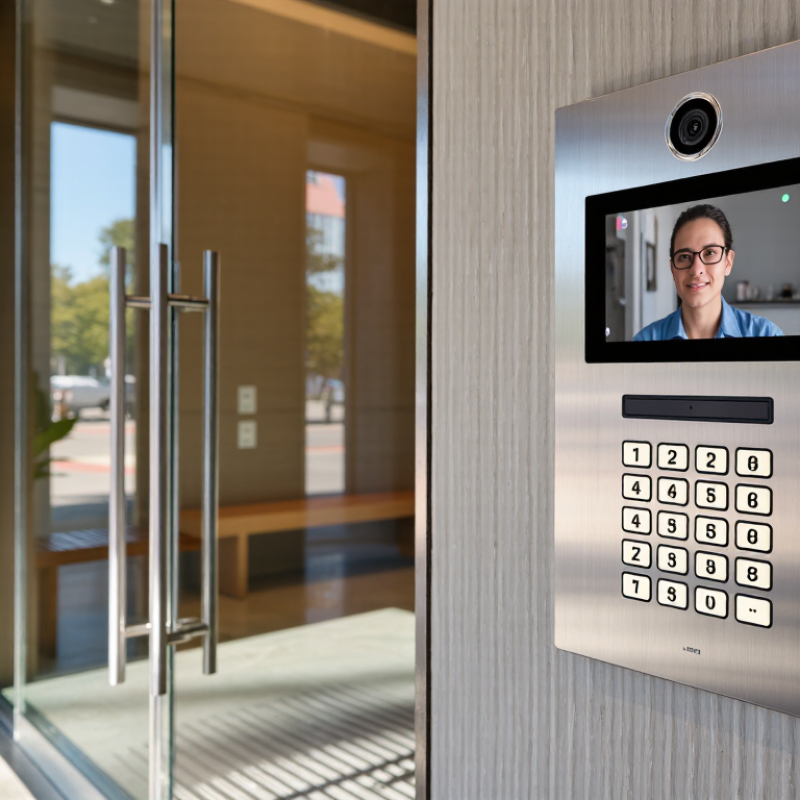
Understanding How Video Keypad Door Entry Systems Work
A video keypad door entry system links a camera, microphone, keypad, controller, and electric lock. When a visitor presses the call button, the indoor monitor or connected device shows live video and carries two-way audio. The resident can check the visitor before releasing the door. No answer means the lock stays secured, depending on the system’s settings.
A valid PIN is checked by the controller, which then signals the lock to open. Some systems use separate PINs for residents and temporary visitors, making access easier to manage. The keypad does not usually operate the lock directly; a control unit handles that step. There is a small catch: wiring, network outages, or a weak power supply can interrupt parts of the process. A backup power source can help, but it needs regular testing.
Look closely at how the system handles stored video, access records, and software updates. These details matter as much as camera resolution. Choose a camera that captures faces clearly at the entrance, including in low light, and check that the keypad can withstand rain and temperature changes. A narrow view may miss someone standing beside the door. I still find that easy to overlook. Installation also affects performance: test audio, PIN entry, and lock release from both sides before relying on daily use.
How to Choose the Best Video Keypad Door Entry System? — Understanding How Video Keypad Door Entry Systems Work
| System Feature | How It Works | What to Check When Choosing | Practical Consideration |
|---|---|---|---|
| Video and visitor communication | A camera captures the visitor at the entrance, while a speaker and microphone allow two-way communication with a resident or receptionist. | Check camera field of view, image performance in low light, audio clarity, and whether calls can be answered on an indoor monitor, phone, or both. | A wider view can help cover the approach to the door, but camera placement and lighting also affect how clearly visitors can be identified. |
| Keypad access | Visitors or authorized users enter a PIN. The controller checks the code against its access rules and can trigger the door release if it is valid. | Look for individual PINs, the ability to change or revoke codes, and options to limit access by schedule where those functions are needed. | Individual codes are easier to manage and audit than one shared code. Avoid placing the keypad where entered PINs are easily observed. |
| Other credentials | Depending on the system, users may also gain entry with a proximity card, fob, mobile credential, or another supported method. | Confirm the reader technology and credential format are compatible with existing credentials and the access-control controller. | Offering more than one authorized access method can provide convenience, but each method adds configuration and credential-management requirements. |
| Call and entry sequence | A visitor selects a resident or enters a unit number, the system places a call, and an authorized recipient can verify the visitor and release the door. | Check directory options, call routing, support for multiple units, and whether door release is available from the answering device or app. | For multi-tenant buildings, a clear directory and reliable call routing can reduce missed calls and confusion at the entrance. |
| Door lock and release | The entry system sends a release signal to an electric strike, electromagnetic lock, or another compatible locking device. | Verify the lock’s voltage, current requirements, wiring, controller relay rating, and required exit hardware with a qualified installer. | Fail-safe locks unlock when power is removed; fail-secure locks remain locked from the secure side when power is removed. Life-safety and egress requirements must guide the choice. |
| Power and network | The panel, camera, and controller may use separate power supplies or, when supported, Power over Ethernet (PoE) for power and network connectivity over one Ethernet cable. | Check the device’s power requirements, PoE standard and power budget if applicable, network connection, and backup-power arrangements. | PoE can simplify cabling, but the switch or injector must provide sufficient compatible power. Network-dependent features may be affected by connectivity loss. |
| Connectivity and remote access | Network connectivity can enable remote calls, app-based door release, configuration, or notifications, depending on the system design. | Clarify which functions work locally, which require internet access or a service subscription, and how accounts and remote access are secured. | Confirm what happens during an internet outage. A properly designed local access path can keep essential entry functions available when cloud services are unreachable. |
| Event records | The system may record access events such as PIN use, credential presentation, door release, or denied entry. | Check which events are logged, how long records are retained, who can view them, and whether the system provides export or time-synchronization options. | Logs can help with audits and troubleshooting, but video and access records should be handled according to applicable privacy and retention rules. |
| Outdoor durability | The entry panel is exposed to weather, temperature changes, dust, and frequent handling. | Review the manufacturer’s stated ingress-protection rating, operating-temperature range, mounting requirements, and suitability for the installation location. | Choose equipment rated for the actual exposure. A sheltered installation can improve usability and reduce direct exposure to rain and glare. |
| System integration | The door-entry panel may connect to access-control software, building intercoms, cameras, or other security equipment through supported interfaces. | Confirm protocol and software compatibility, integration requirements, licensing, and whether the system can support the intended number of doors and users. | Compatibility should be verified before purchase; products that use similar connectors or protocol names are not necessarily interoperable. |
| Best-fit application | System requirements vary between a single home entrance, a small office, and a multi-unit building. | List the number of entrances and users, expected visitor volume, access methods, remote-answering needs, and management responsibilities. | A simpler standalone system may suit a single entrance, while multi-tenant or multi-door sites often benefit from centralized user, schedule, and event management. |



Our quality management system is registered to ISO 9001: 2015. Our team is dedicated to consistently providing quality service and products to our customers.