
How to Choose the Best Multi Cable Charger?
Choosing the right multi cable charger is not simply a matter of counting ports. A compact charger may support several devices, yet still charge them slowly or unevenly. The best choice depends on your phone, tablet, earbuds, laptop, travel habits, and available power outlets.
In practical testing, small details matter. Check the total wattage, connector types, cable length, and charging protocols before buying. A charger with USB-C Power Delivery can suit newer phones and tablets, while older devices may need USB-A support. Look for clear specifications, heat-control features, durable insulation, and recognized safety marks appropriate to your region. Do not rely only on attractive packaging or impressive port numbers.
My first multi cable charger looked convenient on a crowded desk. However, its attached cables were too short for bedside use, and several devices charged more slowly together. That experience changed how I compare products. Real performance matters more than a polished product photo. Sometimes, one powerful port is more useful than four weak ones. There is no perfect model.
This guide examines how to choose a multi cable charger with practical, evidence-based criteria. It considers compatibility, charging speed, portability, build quality, and long-term reliability. You will also learn which marketing claims deserve closer inspection. Check the details carefully. A few minutes of comparison can prevent tangled cables, wasted money, and disappointing charging sessions.
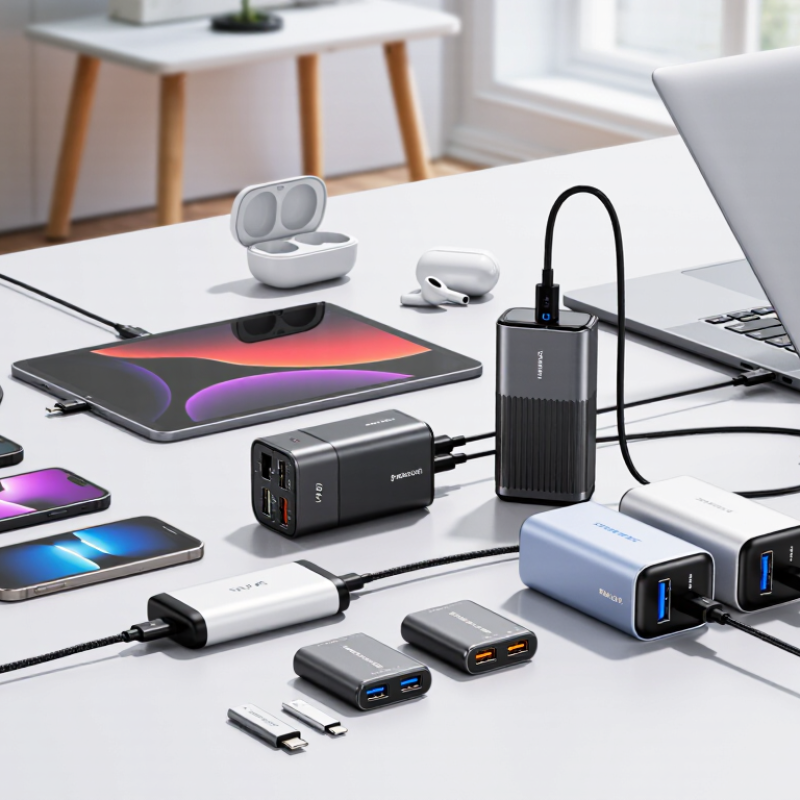
Understanding Multi-Cable Charger Types and Charging Standards
How to Choose the Best Multi Cable Charger?
Choosing a multi-cable charger starts with its cable types and charging standards. IDC’s Worldwide Quarterly Mobile Phone Tracker estimated 1.24 billion smartphones shipped globally in 2024. Counterpoint Research reported a slightly different total, showing that market estimates vary by method. That difference matters. It reminds buyers to check real specifications, not impressive packaging.
Fixed-cable chargers are convenient for travel, while detachable-cable models offer easier replacement. A USB-C-to-USB-C cable usually supports modern Power Delivery charging. USB-A ports remain useful for older accessories. The USB Power Delivery 3.1 specification supports power levels up to 240 watts, but the charger, cable, and device must all support that level. More watts do not always mean faster charging. One device may receive maximum power, while three connected devices share a smaller output.
Look for clear power-allocation details. Check whether the charger supports 5V, 9V, 15V, or 20V profiles. High-power USB-C cables may require electronic identification components. I once chose a compact charger without checking shared output. It charged two devices slowly. A little frustrating. Heat also deserves attention. A warm adapter can be normal, but excessive heat suggests poor airflow or inefficient conversion. Independent safety testing, over-current protection, and transparent certification details provide stronger evidence than a high wattage claim.
| Multi-Cable Charger Type | Typical Connector Combination | Common Charging Standard | Typical Power Capability | Best Use Case | Main Advantages | Important Limitations |
|---|---|---|---|---|---|---|
| USB-C to USB-C | USB-C plug on both ends | USB Power Delivery (USB PD); USB Type-C current modes | Up to 60 W with many standard cables; higher-rated cables can support up to 240 W when the charger, device, and cable all support the required USB PD specification | Recent phones, tablets, laptops, handheld consoles, and other USB-C devices | Highest versatility and strongest support for fast charging | Actual power depends on the charger, device, cable rating, and charging profile. A USB-C connector alone does not guarantee USB PD. |
| USB-C to USB-A | USB-C plug on one end and USB-A plug on the other | USB Battery Charging 1.2, device-specific fast-charge protocols, or basic USB charging | Commonly up to 5 V and 3 A on compatible equipment; many USB-A ports provide less | Older wall chargers, computers, vehicle chargers, power banks, and legacy USB-A ports | Works with a wide range of older charging equipment | USB-A generally does not provide the full USB PD feature set. Charging speed is often lower than USB-C to USB-C. |
| USB-C to Micro-USB | USB-C plug and Micro-USB plug | Basic USB charging; USB Battery Charging 1.2 on compatible devices | Usually up to 5 V and approximately 1.5–3 A, depending on the device and cable | Older headphones, cameras, e-readers, speakers, controllers, and small accessories | Convenient for maintaining older Micro-USB equipment | Micro-USB devices normally cannot use modern USB-C PD power levels. The device determines the final charging rate. |
| USB-C to Reversible Mobile Connector | USB-C plug and a reversible device-specific connector | USB PD may be available when supported by the charger, cable, and device | Often supports up to approximately 20–30 W on compatible mobile devices, but the device may limit the input | Phones, tablets, and accessories using a reversible proprietary connector | Combines a modern USB-C source with convenient reversible device charging | Compatibility and maximum power vary by device generation and connector design. Data-transfer support may also vary. |
| USB-A Multi-Tip Cable | USB-A source connector with interchangeable or integrated device tips | Basic USB charging; USB Battery Charging 1.2 where supported | Typically 5 V; current is commonly limited by the USB-A source and selected device tip | Travel kits containing older phones, accessories, and low-power electronics | Compact and useful when several legacy connectors are needed | Usually not suitable for modern laptop charging or high-power USB PD. Removable tips can be easier to lose or damage. |
| USB-C Multi-Tip Cable | USB-C source connector with USB-C, Micro-USB, and reversible mobile tips | USB PD may work only through the USB-C to USB-C path; other tips may use basic USB charging | USB-C to USB-C may support high power if correctly rated; legacy tips are generally lower power | Travelers charging a mixed collection of modern and older devices | One cable can cover several connector requirements | Power delivery is not necessarily identical across every tip. Avoid assuming that all attached connectors support the same wattage. |
| Three-Connector Simultaneous Cable | One source cable branching into three device connectors | Usually basic USB charging; some models support USB PD only on a designated USB-C branch | Shared output is common; total power may be divided among connected devices | Charging several low- or medium-power devices from one port | Reduces cable clutter and is convenient for bedside or travel use | Connecting multiple devices can reduce charging speed. It is generally unsuitable for high-power laptops unless explicitly rated for that use. |
| Data-Capable Multi-Cable | Multi-connector cable with charging and data-transfer conductors | USB 2.0 or USB 3.x data signaling, plus the applicable charging standard | Power capability varies independently from data speed; many cables provide charging but only USB 2.0 data rates | Users who need file transfers, device synchronization, and charging | More functional than charge-only cables | Connector shape does not identify data speed. Check the stated data rate before purchasing. |
| Charge-Only Multi-Cable | One source connector with multiple charging tips | Basic USB charging or limited device-specific fast charging | Determined by the source port, cable construction, and connected device | Simple charging of accessories where data transfer is unnecessary | Often lighter, less expensive, and easier to pack | Cannot be used for synchronization, firmware updates, or file transfers. Some devices may not recognize it for data purposes. |
Related Posts
-
How to Choose the Best Multi Cable Charger for Your Devices: Key Features and Expert Insights
-
Best Cable Wire Connectors in China for Global Buyers?
-
7 Best Armoured Cable Glands for Global Buyers?
-

China Top XLPE Insulated Power Cable Manufacturers?
-
10 Best Electrical Cable Connectors for Optimal Performance?
-

Innovative Uses of Electric Cable Wire in Modern Technology


Our quality management system is registered to ISO 9001: 2015. Our team is dedicated to consistently providing quality service and products to our customers.